# hack-house
### encrypted collaborative terminal sessions with a summoned sandbox
[](https://opensource.org/licenses/MIT)
[](https://www.rust-lang.org/)
[](https://www.python.org/downloads/)
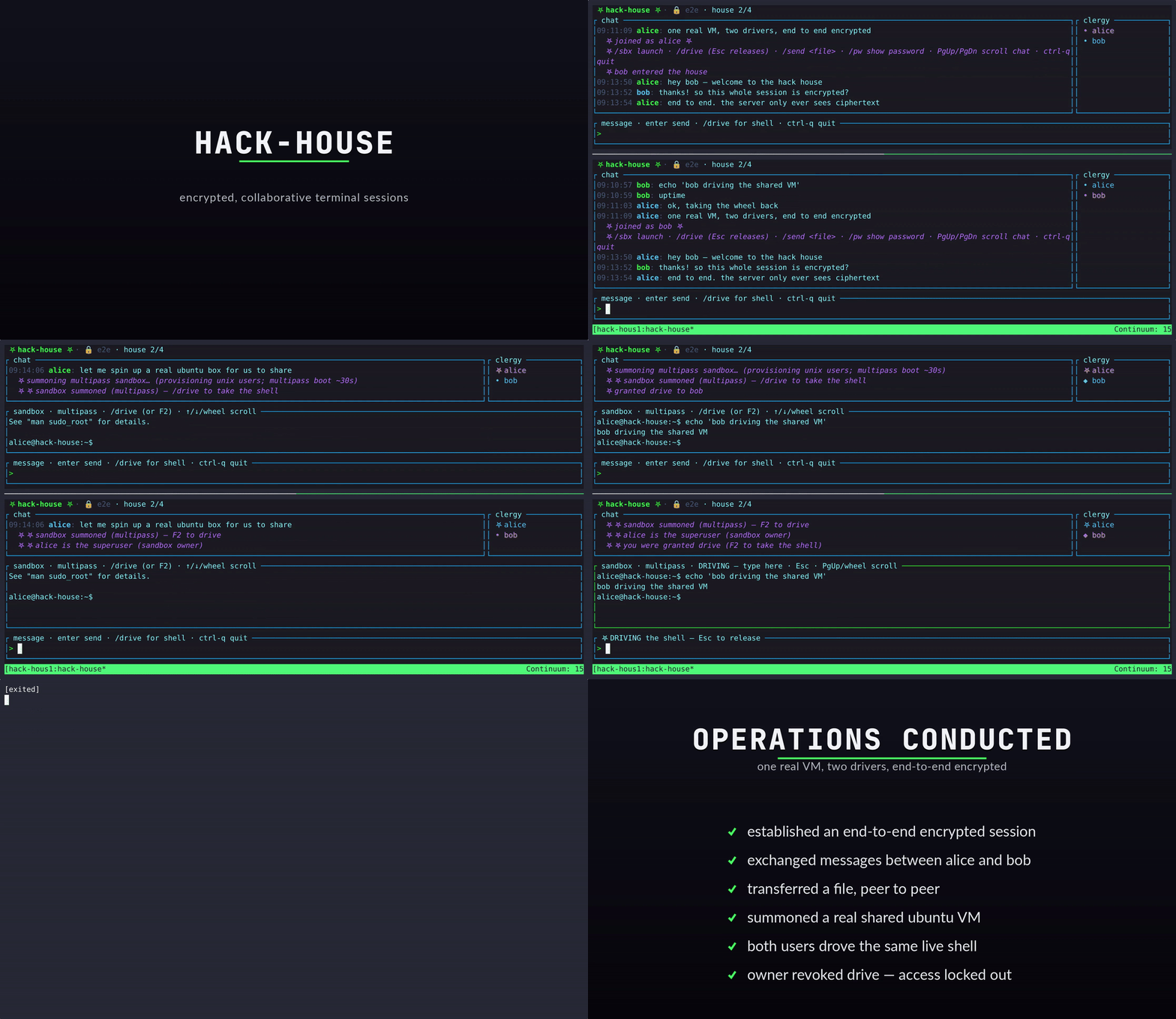
*Two clients sharing a multipass sandbox — summon, drive the shell, real per-user sudo.*
---
Fork from https://github.com/diorwave/cmd-chat
This tool a privacy and security oriented chatroom that we added file sharing as well as shared terminal sessions.
For sharing. For learnng. For hacking. For building. For demos. For teaching. For mentorhsip for the people who dont want to trust corporations to manage their data and communications.
Encrypted chat that runs in your terminal. You host the server, you control the room. Close the window — everything's gone. Messages and files are encrypted client-side before the server ever sees them.
## Features
- **End-to-end encrypted** — Fernet (AES-128-CBC + HMAC), encrypted client-side before anything leaves your machine
- **SRP authentication** — the password is never sent over the network (zero-knowledge proof)
- **Zero-knowledge server** — relays only ciphertext; cannot read messages, files, or terminal output
- **RAM only** — nothing persisted on the server; close it and history is gone
- **Shared sandbox** — summon a disposable `local` / `docker` / `multipass` box the whole room can watch and drive
- **Snapshot save/load** — freeze a sandbox to a named snapshot and restore it later (`/sbx save` · `/sbx load` · `/sbx snaps`)
- **Local VirtualBox VMs** — `/sbx vms` detects VirtualBox and lists your VMs; `/sbx gui ` opens a desktop VM locally for the room to gather around — per-user consent gate, with automatic resolution of VT-x conflicts (Docker Desktop / multipass)
- **Real permissions** — the host grants/revokes *drive* (keyboard) and *sudo* (VM superuser) per user; **stacking roster badges** show exactly who holds what, both in the clergy panel and inline on every chat message
- **Local-first AI agent** — `/ai start` summons an in-room AI that runs against *your own* [Ollama](https://ollama.com) (no API key, nothing leaves your machine); replies **stream token-by-token** with **in-RAM semantic recall** of the conversation for context; model-agnostic, addressed-only, end-to-end encrypted like every other client
- **Encrypted file transfer** — `/send` → `/accept` with SHA-256 verification
- **TLS** — self-signed by default, or bring your own cert; `--no-tls` for local/Tailscale use
- **Themes** — seven switchable "vestments" (`crypt` default · `church` · `neon` · `blush` · `matrix` · `wraith` · `goldcrypt`), plus a live randomizer
## Layout
| Path | What |
|------|------|
| `hh/` | The Rust `ratatui` client (the flagship) |
| `cmd_chat/`, `cmd_chat.py` | The Python (Sanic) server + legacy Python client |
| `cmd_chat/agent/` | The model-agnostic AI agent bridge (joins a room as an encrypted client) |
| `models.toml` | Named provider profiles for `/ai start ` (see `docs/providers.md`) |
| `docs/providers.md` | Connect any model — profiles, flags, discovery, bring-your-own-provider |
| `hh/lets-hack.sh` | Spin up a local test "clergy" in tmux (server + N client panes) |
| `bootstrap-ai.sh` | Optional: install Ollama + pull a model for the local `/ai` agent |
| `hh/direnv-autostart/` | `cd` into a directory to auto-launch a session (direnv) |
## Quick start
```bash
git clone https://github.com/leetcrypt/hack-house.git
cd hack-house
```
### 1. One-shot setup (`bootstrap.sh`)
Checks prerequisites, creates the Python venv, installs the server's
dependencies, and builds the Rust client:
```bash
./bootstrap.sh # venv + deps + debug build
./bootstrap.sh --release # release build
./bootstrap.sh --check # report tooling only, change nothing
```
> `bootstrap.sh` does **not** touch direnv — the autostart in step 4 is a
> separate, opt-in convenience.
**Optional AI layer (`bootstrap-ai.sh`).** Want the local `/ai` agent? This runs
the baseline setup first, then installs Ollama (if missing) and pulls a default
model — nothing here changes the AI-free baseline above:
```bash
./bootstrap-ai.sh # baseline + Ollama + qwen2.5:3b
./bootstrap-ai.sh --check # report only, change nothing
HH_AI_MODEL=llama3 ./bootstrap-ai.sh # pull a different model
```
### 2. Try it in tmux (`lets-hack.sh`)
The fastest way to see it working: builds the client, boots a fresh `--no-tls`
server on `127.0.0.1:4173`, and opens a pane per user.
```bash
cd hh
./lets-hack.sh # alice + bob, tiled in tmux
./lets-hack.sh neo trinity # custom users
./lets-hack.sh --theme neon # pick vestments
./lets-hack.sh --reuse # keep a live server (reconnect tests)
./lets-hack.sh --kill # tear it all down
```
### 3. Manual setup
**Server** (Python):
```bash
pip install -r requirements.txt
python3 cmd_chat.py serve 0.0.0.0 3000 --password
```
**Client** (Rust):
```bash
cd hh
cargo build --release
./target/release/hack-house connect 3000 \
--password --insecure
```
| Flag | Purpose |
|------|---------|
| `--password` | Room password (required) |
| `--no-tls` | Connect without TLS (local / trusted tunnel) |
| `--insecure` | Skip TLS cert verification (self-signed certs) |
| `--theme ` | Load a vestments TOML (see `hh/themes/`) |
### 4. Autostart with direnv (optional, separate)
A convenience for daily use, independent of `bootstrap.sh`. Run the one-time
setup once:
```bash
cd hh/direnv-autostart
./setup.sh # installs direnv, hooks bash/zsh, `direnv allow`s this dir
```
After that, simply `cd`-ing into the directory launches a single session for the
logged-in user with a freshly minted **in-memory** room password (reveal it
in-app with `/pw`, share it out-of-band to invite others). The password is
generated at launch and never written to disk — matching the project's RAM-only
model. If a session is already live, it just points you at it.
## Using it
Type to chat. Slash commands and keys:
| Command / key | Action |
|---|---|
| `` ↵ | Send an encrypted chat message |
| `/help` · `F1` | Help overlay |
| `/pw` | Show this room's password (local only — never broadcast) |
| `/theme [name]` | Switch vestments, or list them |
| `/send ` | Offer a file (or directory) to the room |
| `/accept` · `/reject` | Respond to a pending file offer |
| `/ai start [model\|profile]` | Summon a local AI agent (default `ollama/qwen2.5:3b`; a bare name is a `models.toml` profile) |
| `/ai stop` | Dismiss the agent you summoned |
| `/ai ` | Ask the agent (`/ai ` if several present) |
| `/ai list` | List the agents present (or hint to `/ai start` if none) |
| `/ai models` | Models the active agent can serve — or, with no agent, your local Ollama tags |
| `/sbx launch [local\|docker\|multipass] [image]` | Summon the shared sandbox |
| `/sbx stop` | Tear down the sandbox you host |
| `/sbx save [label]` · `/sbx load